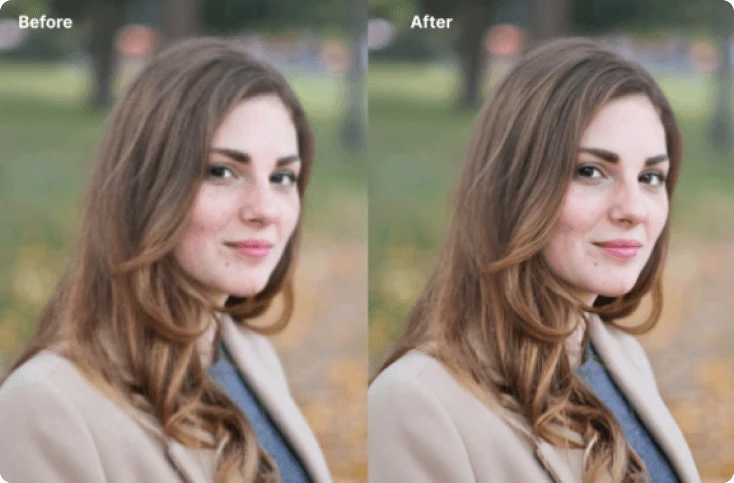

Blurry photos can ruin precious memories, professional projects, and social media posts. Whether your image becomes blurry because of camera shake, poor lighting, low resolution, or incorrect focus, modern AI technology now makes it possible to restore image clarity online in just a few clicks. The best part is that many tools allow you to remove photo blur online free without requiring advanced editing skills.
In recent years, AI-powered image enhancement has improved dramatically. Deep learning models can now sharpen edges, restore facial details, reduce noise, and upscale low-quality images with impressive results. Research in AI image enhancement and denoising has shown that neural networks can significantly improve image quality and restore lost visual details.
This guide explains how to remove blur from photos online for free, what causes image blur, and how AI tools like Vidmud photo enhancer can help you restore image quality instantly.
What Causes Photo Blur?
Before fixing blurry images, it helps to understand why blur happens in the first place. Here are the most common reasons:
1. Camera Shake
Small hand movements while taking a photo can create motion blur, especially in low-light conditions.
2. Incorrect Focus
If the camera focuses on the wrong subject, the intended object appears soft or blurry.
3. Low Resolution
Compressed or low-quality images lose details and appear fuzzy when enlarged.
4. Poor Lighting
Dark environments force cameras to use slower shutter speeds, often resulting in blur and noise.
5. Motion Blur
Fast-moving objects may appear streaked if the camera cannot capture them quickly enough.
Fortunately, AI tools can now analyze blurry areas and intelligently reconstruct sharper details.
How AI Removes Blur from Photos
Traditional sharpening filters only increase contrast around edges, often making images look unnatural. Modern AI photo enhancement works differently.
An AI photo enhancer uses machine learning models trained on millions of images to identify patterns, textures, and facial features. The AI predicts missing details and reconstructs clearer visuals automatically.
AI enhancement can help with:
- Face restoration
- Motion blur reduction
- Image sharpening
- Noise reduction
- Color correction
- Resolution upscaling
- Detail recovery
Because AI enhancement is automated, users no longer need Photoshop expertise or expensive software.
How to Remove Photo Blur Online Free
Here is a simple step-by-step method to sharpen blurry photos online.
Step 1: Choose an AI Photo Enhancer
Select a reliable online AI enhancer that supports blur removal and image sharpening. A good tool should offer:
- Fast processing
- High-quality enhancement
- Privacy protection
- Free access
- No complicated installation
One convenient option is Vidmud AI Photo Enhancer, which provides online image enhancement directly from your browser.
Step 2: Upload Your Blurry Image
Most AI enhancers support common image formats like:
- JPG
- PNG
- WEBP
Simply drag and drop your image into the tool interface.
With Vidmud photo enhancer, users can upload images quickly without creating an account, making the process simple and accessible.
Step 3: Let AI Process the Image
The AI system automatically analyzes your photo and applies enhancement algorithms to improve:
- Sharpness
- Texture
- Facial details
- Contrast
- Clarity
Advanced AI systems can even recover details from old or heavily blurred photos.
Step 4: Download the Enhanced Photo
Once processing is complete, preview the enhanced image and download the final version.
Online AI enhancement eliminates the need for desktop editing software, making it ideal for beginners and casual users.
Why AI Photo Enhancers Are Becoming Popular
AI image enhancement tools have gained popularity because they save time and deliver professional-looking results instantly.
According to discussions in AI communities, many users specifically look for tools that are free, require no sign-up, and prioritize privacy protection.
People now use AI enhancers for:
- Restoring old family photos
- Improving social media images
- Fixing blurry selfies
- Enhancing product photos
- Upgrading profile pictures
- Sharpening travel memories
The convenience of browser-based editing has made online AI enhancement especially attractive.
Why Use Vidmud AI Photo Enhancer?
Among many online tools available today, Vidmud AI Photo Enhancer stands out because it focuses on ease of use, accessibility, and privacy.
Here are some notable advantages:
1. No Sign-Up Required
One of the biggest frustrations with online tools is mandatory account registration. Vidmud allows users to start enhancing photos immediately without signing up. This makes the workflow faster and more convenient.
2. Free Online Access
Many AI editors lock advanced enhancement behind subscriptions or watermarks. Vidmud offers free AI-powered enhancement directly online, making it accessible for casual users and beginners.
3. Privacy Secured
Privacy is increasingly important when uploading personal images online. Vidmud emphasizes security and user privacy in its platform policies.
The platform states that it safeguards user data and follows privacy-focused handling practices. For users concerned about image security, this can be an important factor when choosing an online enhancer.
4. No Complex Installation
Because Vidmud runs directly in the browser, there is no software download or installation required. Users can enhance photos from desktops, tablets, or mobile devices instantly.
5. AI-Powered Enhancement
The platform uses AI technology to improve image clarity, restore details, sharpen edges, and upscale visuals automatically.
This makes it useful for both everyday users and content creators.
Tips for Getting Better Blur Removal Results
Even the best AI tools work better when the original image quality is reasonable. Here are a few tips:
Use the Highest Resolution Available
Avoid heavily compressed screenshots or tiny images whenever possible.
Avoid Multiple Filters Before Enhancement
Applying filters before AI sharpening can reduce restoration quality.
Crop Unnecessary Areas
Focusing on the subject helps the AI prioritize important details.
Use Good Lighting in Future Photos
While AI can fix many issues, starting with a better original image always improves results.
Online AI Enhancement vs Traditional Editing Software
Many users wonder whether online AI tools are better than traditional software like Photoshop.
Here is a quick comparison:
| Feature | Online AI Enhancer | Traditional Editing Software |
| Beginner Friendly | Yes | No |
| Instant Results | Yes | Often slower |
| Requires Installation | No | Yes |
| Manual Editing Skills Needed | Minimal | High |
| Free Access Available | Often | Limited |
| AI Automation | Advanced | Partial |
For quick blur removal and everyday enhancement, online AI tools are usually more convenient.
Final Thoughts
Removing blur from photos online free has become easier than ever thanks to AI-powered image enhancement. Instead of spending hours manually editing images, users can now sharpen blurry photos instantly using browser-based AI tools.
Whether you want to restore old memories, improve selfies, or sharpen low-quality pictures, AI enhancement technology offers fast and effective solutions.